Tuesday, April 8, 2014

How to Pick a DMCA Official Protection Badge for your Website or Blog

Almost Blogger are known about DMCA (Digital Millennium Copyright Act), you can protect your website or blog using DMCA Official Protection Badge. It increasing design & create value on visitor eye.
DMCA ,Official ,Protection Badge,How to Pick,blogger,website
Process of Adding DMCA Official Protection Badge:
01. Go to this site DMCA
02.  Two ways you choose that badge
         a) Official Protection Badges
         b) Build your Own Badge

03. Copy your likable Badge code
04. Now go to blogger layout option & add this code by take HTML.
All
Process Finished

Thanks for staying with us...


How to Create a Blog in Blogger.com

How to Create,Blog,Blogger.com,logoDear friends this post is only for those people (Newbie) who don't know how to create a blog in
blogger.com.
Blogger.com is an awesome product of Google.com, here you can share your write,opinion,picture,video free beside you also make money by many way such as Google adsense,media.net.etc..
Feature of Blogger.com
01. Free blogging opportunities
02. Share your article,pictures,video etc
03. Unlimited space for share rticle,pictures,video (youtube,dailymotion)
04. Make money by blogging. etc
How to Create a Blog in Blogger.com:
01.Go to www.blogger.com.
02. Sign in here with your Google account (Gmail).
03. Choose your blogger profile.
04. Click on New Blog.
05. Now Give your Blog Tiltle & blog Domain name.

How to Create Popup Window for Blogger | Popup Ads Code

Dear Today I share an awesome tips for blogger or newbie who want to create popup window or ads code for your blogger blogs.It is a so much important for blogger because you can increasing visitors from one blog to another blog besides increasing your earning and page view.
How to Create,Popup Window,Blogger,Popup Ads Code

How to create a popup window for Blogger:

It a very simple you can easily do this task. Just follow the below instruction.
01. Login blogger.com and go to your blogger dashboard.
02. Click on layout menu of blogger.
03. Take a HTML/JavaScript gadget.
04. Copy the below script or code from below and paste HTML/JavaScript content area and save it.
Now reload your blog site and enjoy it.

Code:

<script type="text/JavaScript">
document.body.onclick= function(){
window.open(http://beingshuvo.me', 'poppage', 'toolbars=0, scrollbars=1, location=0, statusbars=0, menubars=0, resizable=1, width=950, height=650, left = 300, top = 50');
}</script>

You have too little change this above code just Replace red color my blog URL and put here you expected blog or website URL.

Thanks everybody, have a nice day.

How to Make Table in Blogger without Coding

Most of the newbie blogger want to create table in blogger but they are failed because they have not sufficient knowledge about HTML coding once time am also suffer such types of problem and search internet about how to create table in blogger. A lot of browsing I found a solution how to solve about this problem.

So today I discuss how to make table in your blog without knowledge of HTML or any coding.
Benefit of Table in Blogger -Table makes your post attractive; you can attract your data serially.

Process of make table in Blogger:


Create Table in Excel of MS Word:

01. First create table with your expected data in MS Excel or word sheet with color & design.
02. When your table done just copy this table.
How to convert table in HTML:

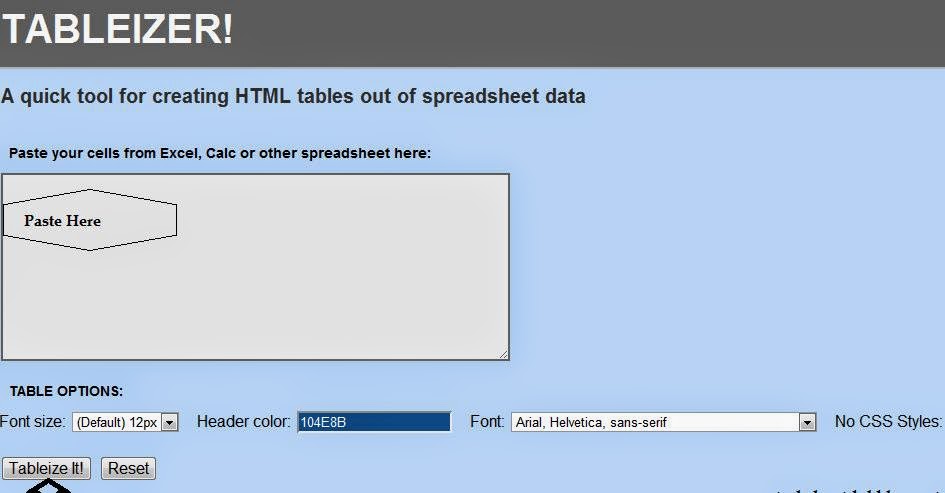
01. Go to Tableizer and paste your copied table in this site box.
02. If you need,you can also change front, heading color, front size.
03. After the all process you click on the Tableizer.
04. Now copy your Table coding.
How to insert it into the blogger post:
01. Go to the blogger Dashboard.
02. Next click on new post or where you want to show table.
03. Change your Compose mood to HTML mood of your post.
04. Now just paste those coding here & Click on compose and publish it.

Finally wonderful table you can make without know about any coding or HTML.
Enjoy happy blogging. To get such types of blogger tips & tricks join this blog as a follower.